Edge System Requirements
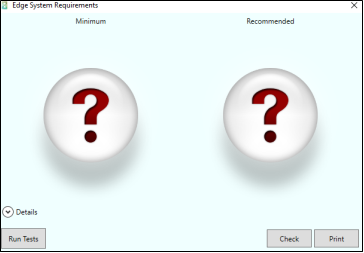
Use the Edge System Requirements link from the Edge Cloud Help menu to open the Edge System Requirements application, which can help you determine how well-suited your computer is for running Edge Cloud.
Open Edge System Requirements
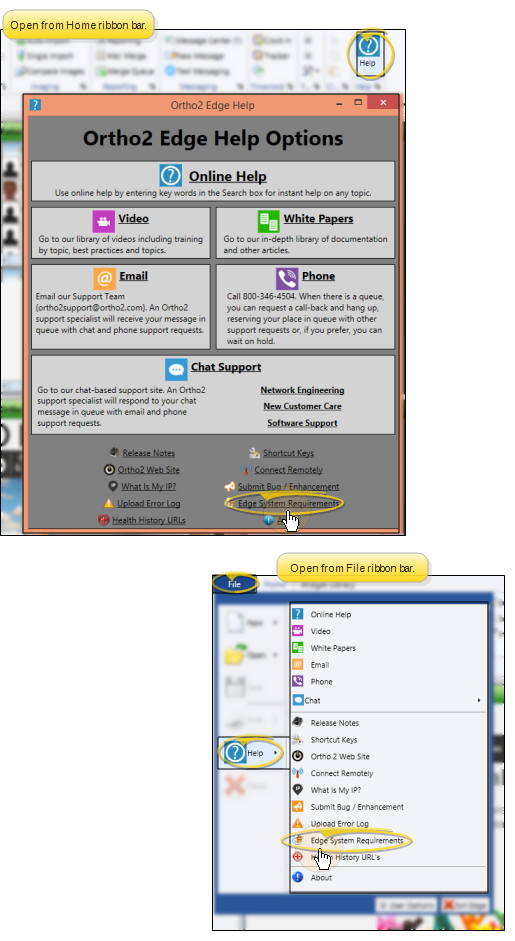
Select Help from the Home or File ribbon bar, and select the Edge System Requirements link. The first time you open the Edge System Requirements tool, and whenever the application is updated, you will be prompted to install the application on your computer. Once installed, you can run the tool and check your computer performance rating as often as you wish. The application must be installed on each computer you want to check.
Run Tests
Click the Run Tests button to gather performance data about this computer. Running the tests may take a few minutes, and your computer screen may flicker on and off once or twice during the process.
Check Performance Ratings
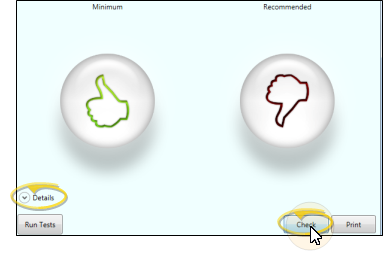
Click the Check button to compare this computer's components against the Edge System Requirements specifications. After the check has been performed, the application displays a simple thumbs up or thumbs down for our minimum and recommended specifications. To show the details that make up each rating, click the Details option. A computer that passes the minimum rating will lead to program performance that is only minimally acceptable. These minimums are meant for non-critical or lower use stations and will not be suitable for all program uses. For a better experience follow the recommended specifications. Passing the recommended rating means the computer should provide an optimal Edge Cloud experience.
Poor Results - A computer showing two thumbs down does not necessarily mean Edge Cloud won't function on that computer, but it does indicate there could be operational issues. By selecting Details, you can see which computer components are suspect. While we can't guarantee it, the computer may work fine as-is. Alternatively specific upgrades may be possible if a better rating is desired. If you have any questions about Edge Cloud system requirements, or the utility results, please contact your Ortho2 Regional Manager.
Print Results
Click the Print button to send the test results to a printer.