
Patient Reward Security
Use the options in your Patient Rewards security group to allow / limit access to Patient Rewards settings and features.
Open the Patient Rewards Security Group
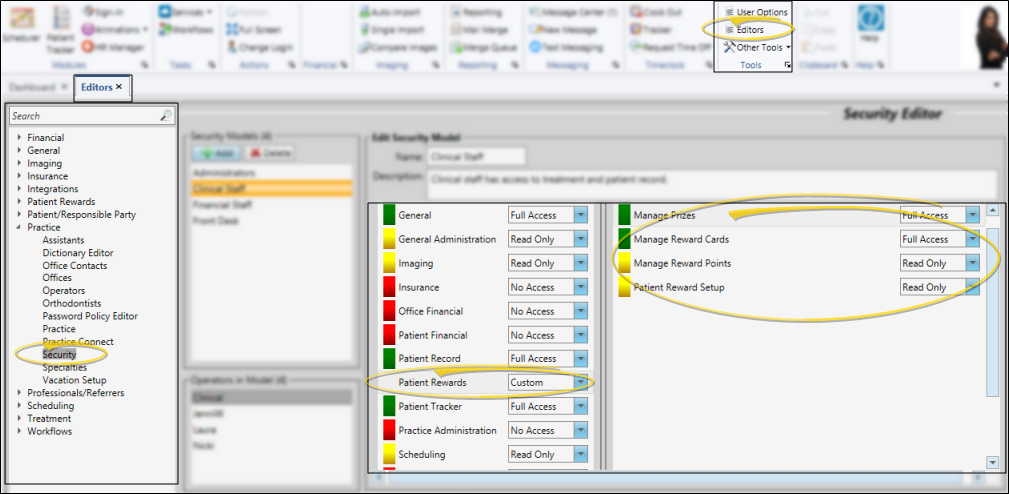
Select Editors from the Tools section of the Home ribbon bar. Then, from the Practice section, open the Security editor. (You can also use the Search field to look for the editor you want to work with.) Select the "Patient Rewards" security group, then work with the settings.
Patient Reward Security Settings
Manage Prizes - Use this setting to allow or prevent users from working with patient reward prizes. Users with No Access cannot view any prize details. Users with Read Only access can view prize lists and pending prizes, but cannot process them. Users with full access can view, edit, and process prize lists and requests.
Manage Reward Cards - Use this setting to allow or prevent users from working with your patients' reward cards. Users with No Access cannot view any reward card details. Users with Read Only access can view patient reward card status, but cannot activate / deactivate them. Users with full access can view, activate and deactivate reward cards.
Manage Reward Points - Use this setting to allow or prevent users from working with patients' reward points. Users with No Access cannot view any patient reward point details. Users with Read Only access can view patient reward points, but cannot change any point balances. Users with full access can view and edit patient points.
Patient Reward Setup - Use this setting to allow or prevent users from working with your Patient Reward settings. Users with No Access cannot view any patient reward setup details. Users with Read Only access can view patient reward settings, but cannot change them. Users with full access can view and change patient reward settings.
Save Changes
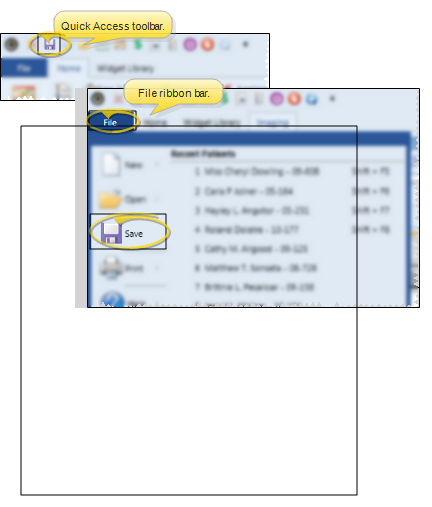
Click Save in your Quick Access toolbar or File ribbon bar (or press Ctrl+S on your keyboard) to save any changes you have made.
See "Security Editor" for details about using the Security editor.