
Assistant List
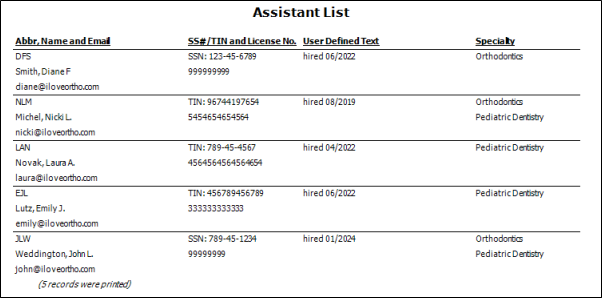
Run the Assistant List report to review the list of active records in your Assitant editor, along with their abbreviations, email addresses, professional identification numbers, and user-defined text responses. If you have Edge Specialist, their specialties are included as well. Only active records are included in the report: Any items flagged Inactive in the editor are omitted.
Set Up Your Assistant List
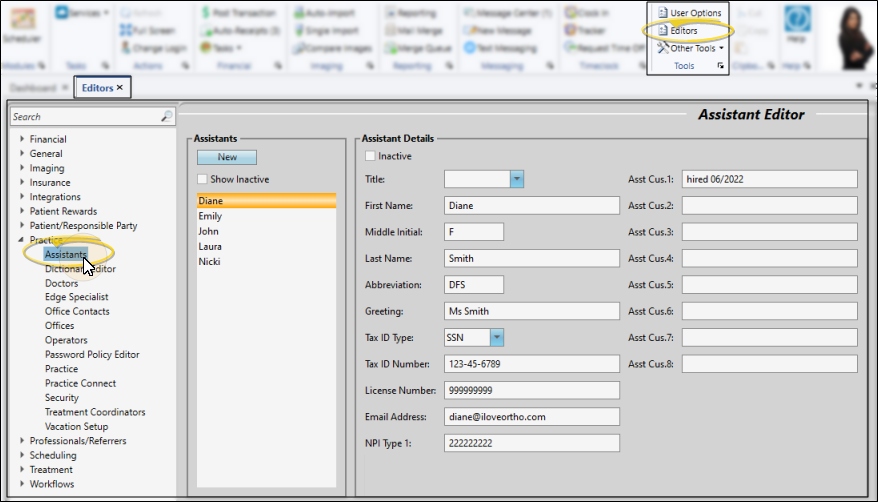
This report gets its data from the Assistant editor. See "Assistant Editor" for details.
Run the Report
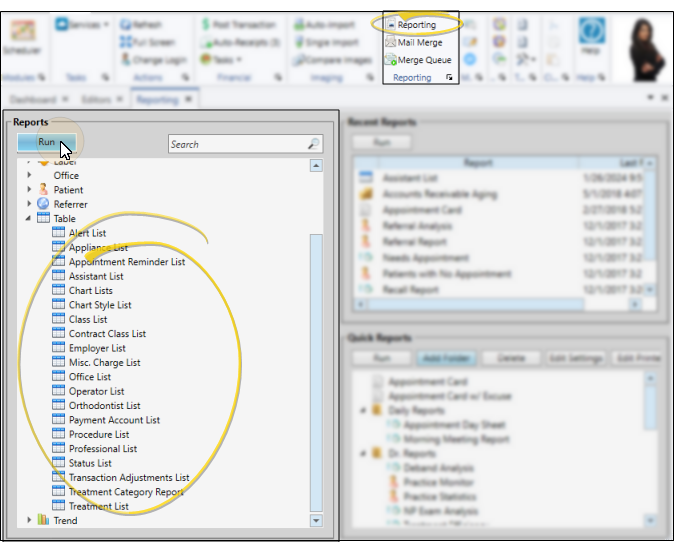
Select Reporting from the Reporting section of the Home ribbon bar. Then from the Table section, open the Assistant List report. You can double-click the report name, or click Run at the top of the window to continue. (You can also use the Search field to find the report you want to work with.) You might also be able to run this report or form from your Recent Reports or Quick Reports list. See "Run Edge Cloud Reports" for details.
Because there are no optional settings, the report runs immediately after you select it. With the results on your screen, you can click View from the left side of the window to refresh the results. In addition, you can manage the output with the toolbar at the top of the report window. See "Report Output Options" for details.