
Get Started with Online Forms
Use the Edge Cloud Online Forms editors to set up your online forms to gather the information you need from your patients, alert you to missing or changed information, link to mail merge documents, and offer patient reward points for completing the form. You can also create links to your online forms that you can use on your own web site so patients and parents can access the form from any convenient location.
Ortho2 is committed to providing the highest level of technical support in the most effective methods possible. Many questions can be answered with our extensive online help resources. In addition, new users are encouraged to work with our Implementation team Phone: 800.809.0277 (8am-6pm Central Time); email: implementation@ortho2.com team. Or, contact us by email Support: ortho2support@ortho2.com; Sales: sales@ortho2.com; Feedback: ideas@ortho2.com, phone Support: 800.346.4504; Sales: 800.678.4644; Implementation Team: 800.809.0277, or fax 515.233.1454Telephone - Support: 800.346.4504; Sales: 800.678.4644; Implementation Team: 800.809.0277Email - Support: ortho2support@ortho2.com; Sales: sales@ortho2.com; Feedback: ideas@ortho2.comOr, browse support.ortho2.com for more options.
Install the Online Forms Viewer
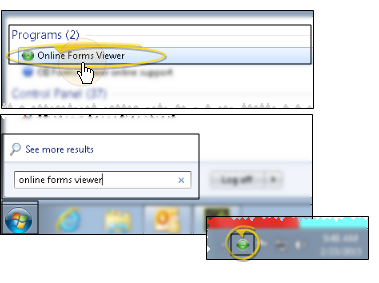
Installing the Online Forms Viewer application is optional. However, if you do install it, you can use the Viewer to launch online forms without having to open your entire Edge Cloud system. For example, you might install the Viewer on a laptop or other workstation in your reception area to provide a convenient place for patients to fill out new forms and update their health histories. See "Online Forms Viewer" for details.
Set Up Your Online Forms
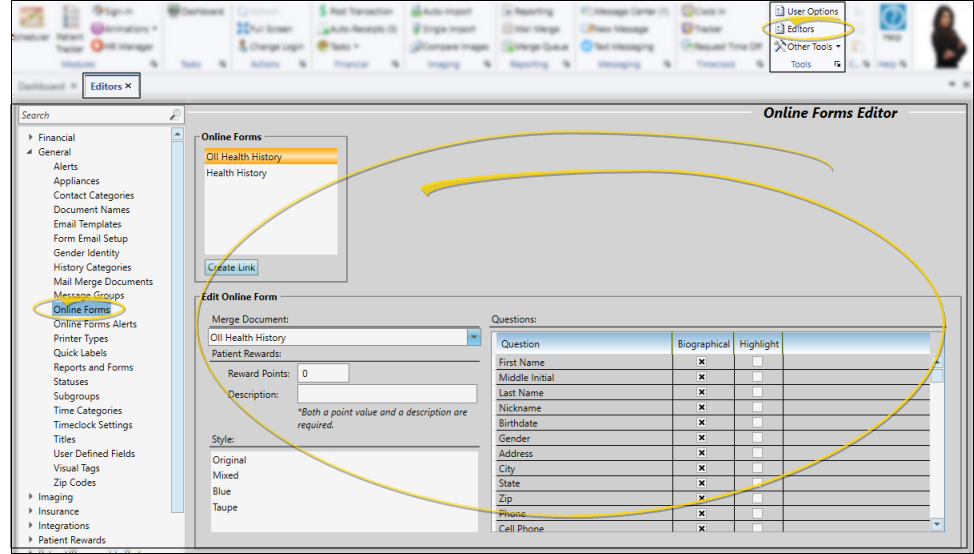
Use the Online Forms editor to select a style for your online forms, categorize form questions, assign Patient Reward points for completing a form, and link mail merge documents to processed forms. You can also create office and doctor specific links for your forms from this editor. These links can contain ad hoc metadata to help you track and filter your forms. See "Online Forms Editor" for details.
Create Online Form Alerts
Use the Online Form Alerts editor to set up alerts that are triggered when a patient's online form response matches your alert criteria, when a patient is due for a health history update, or when a patient has a document pending in the Online Forms Letter Queue. See "Online Form Alert Editor" for details.
Create Online Form URL (Website) Links
You can create links for your online forms that you can add to your website or email to your patients. The patient can then click the link to launch the form you want them to fill out and submit to your office. See "Online Form Hyperlinks and PDFs" for details. In addition, you can create more specific links that can be filtered by office, doctor and any other metadata you choose from the Online Forms editor.